


Aer Lingus App
4.7437.00 Reviews
App Specs
- Version
- 26.4.1
- Updated On
- License
- Free
- Downloads
- 1,000,000+
- Developer
- Aer Lingus
- Categories
- Travel & Local
- Platform
- Android, iOS
Screenshots
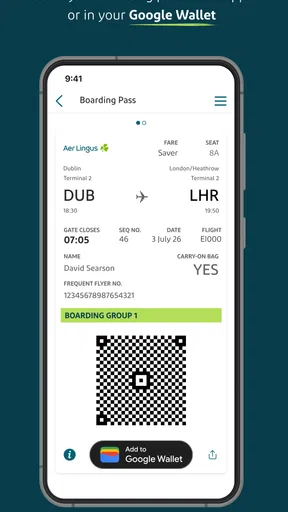
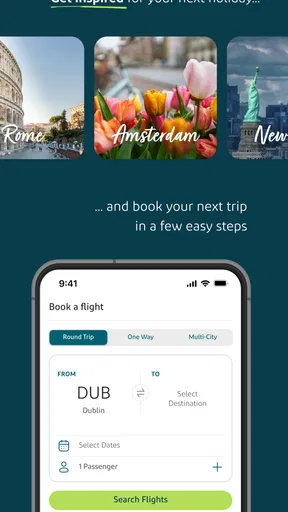
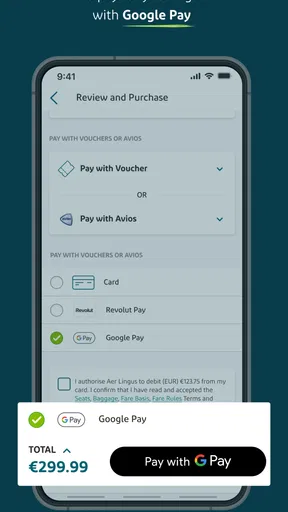

 Analysis by AppCompare
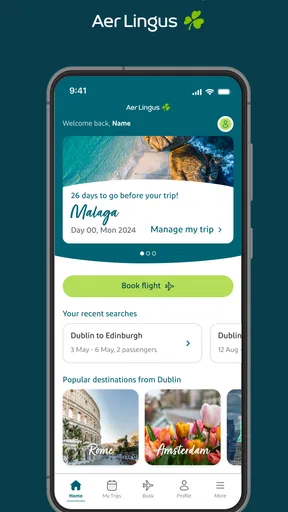
I found Aer Lingus App most useful when I treated it as a focused travel companion rather than a complete holiday planner. It is the official Travel & Local app from Aer Lingus, designed around searching for flights, booking them, and managing the details afterward. That narrow purpose is also its main strength: when I already know I want to travel with Aer Lingus, I can keep the important parts of the journey in one place instead of moving between a browser, email messages, and unrelated travel tools.
The app is free, available to everyone, and has built a strong public reputation with a 4.7 average from around 39 thousand ratings. It has passed the one-million-install mark, which makes it a familiar choice for travelers who use the airline regularly. I reviewed it with a practical question in mind: does it give passengers enough control and clarity during the moments when travel apps matter most, especially around booking, checking details, and making decisions with confidence?
What the app is really good at
The first thing I noticed is that the experience is built around a clear journey. You begin by looking for a flight, continue through the booking process, and then return to the app when you need to manage that trip. This sounds simple, but it matters. Many travel services try to combine flights, hotels, car hire, destination guides, loyalty tools, and advertising into one crowded screen. Aer Lingus App feels more purposeful because its identity is tied to one airline and the flights that airline operates.
That makes it especially suitable for three types of traveler. The first is someone who has already chosen Aer Lingus and wants the airline’s own route into the booking process. The second is a passenger who dislikes relying on a desktop browser while traveling. The third is a person who wants the same place for checking a booking and reviewing travel details after purchase. If you are comparing every airline across every possible route, however, a broad flight-search service will usually be a better starting point. The app is not a neutral marketplace; its usefulness begins once Aer Lingus is part of your plan.
I also appreciated the difference between researching and managing. When I am still deciding where to go, an independent comparison service can make it easier to scan multiple airlines and combinations. Once I have selected Aer Lingus, the official app becomes more relevant because it keeps the transaction and the airline relationship together. That division of labor is sensible: use a comparison tool for breadth, then use the airline’s own app when accuracy and direct access matter more.
The store identifies the developer as Aer Lingus, which is important in a travel context. An official airline app gives me a more direct point of contact with the carrier than a third-party booking interface. That does not mean I stop checking every detail before paying. It does mean I prefer beginning with the airline’s own environment when I need to review a reservation or make sure I am dealing with the correct travel provider.
Booking without losing sight of the details
Flight booking is one of those tasks where a clean sequence is more valuable than flashy design. I want to see the route, dates, passenger information, and selected flight clearly before I commit. The app’s role is strongest when I use it deliberately: search first, pause to check the itinerary, then continue only after confirming that the dates and airports are right.
Worth Reading Before You Choose

EA SPORTS FC Mobile 26 Is a Bigger Football Game, but It Takes Time

Flipboard Shows What News Apps Must Do Beyond the Feed

Switching to Android Auto Means Rethinking Your Driving Routine

Google Calendar Makes a Crowded Week Easier to Manage

Ludo King Makes the Most of the Minutes Between Plans

Baby Panda World Brings Quick Play to Modern Phones, but Its Game Library Feels Busy
My practical advice is not to rush through the first available result. Travel searches can be affected by small choices, such as the departure day, the airport displayed for a city, or the difference between a convenient time and a cheaper time. On a phone, it is tempting to tap through quickly because the screen is smaller than a laptop. I found it safer to treat the review stage as a separate step rather than assuming that the first selection was automatically the best one.
This is also where an airline app differs from a travel aggregator. A comparison service may be better at showing competing prices and schedules, while Aer Lingus App is more appropriate when I want to book directly with Aer Lingus. The trade-off is straightforward: less cross-airline variety, but a more direct relationship with the carrier I have selected.
Managing a trip after the booking is complete
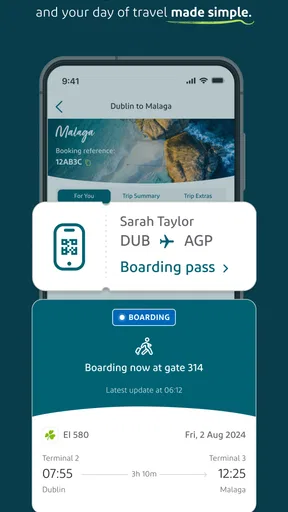
The management side is the part I would return to most often. After booking, travelers commonly need to confirm what they purchased, revisit the itinerary, or check the information connected with the trip. Keeping those actions inside the same app is more convenient than searching through old messages every time I need a reminder.
A useful habit is to open the app before leaving for the airport, not only when something goes wrong. That gives me a chance to review the booking while I still have time to correct a misunderstanding or locate information I may need. I also prefer checking shortly before travel rather than depending entirely on a screenshot saved days earlier. A screenshot can preserve a moment, but the app is the more natural place to revisit the current trip details.
There is a subtle trade-off here. An official airline app can be more relevant than a generic itinerary organizer because it is connected to the airline side of the journey. At the same time, a separate travel organizer may still be better if my trip includes several airlines, trains, hotels, and activities. Aer Lingus App is strongest for the Aer Lingus portion, not for building a complete multi-provider travel file.
Trust starts with choosing the right source
For me, trust in a travel app begins before I enter any personal information. I check the developer name, the app’s purpose, and whether the experience matches the company I intend to use. Here, the connection to Aer Lingus is clear, and the app’s stated job is specific: search, book, and manage flights. That clarity is reassuring because I am not trying to work out whether an unfamiliar service is acting as an intermediary.
Still, an official name should not replace careful reading. I would review the booking summary, passenger details, and payment information before confirming anything. The safest workflow is to use the app as a tool for making a considered decision, not as a reason to skip the normal checks. If a price, route, or travel date looks different from what I intended, I would stop and investigate rather than assuming the app knows what I meant.
The app is free to install, but free access should not be confused with a free flight. The cost belongs to the booking itself, so I would focus on the final transaction details instead of treating the download price as the important financial question. This distinction is obvious in theory and easy to forget when moving quickly through a mobile purchase flow.
Account choices and personal information
Travel apps naturally bring me to data-sensitive moments. Searching for a route is one kind of activity; entering passenger details and managing an existing reservation is another. I separate those moments mentally because the information involved becomes more personal as I move closer to a booking or an identified trip.
My approach is simple: I provide only what the current task requires, read each screen before continuing, and avoid creating extra records or entering details for another traveler without checking them carefully. This is particularly important when booking for family or friends. A small spelling mistake in a passenger field can be more troublesome than an ordinary typo in a shopping app, so I slow down at that stage.
I also pay attention to account controls and visible choices rather than assuming that every setting is permanent. If the app asks me to sign in, I consider whether I need an account for the action I want to perform. If I am offered a choice about notifications or saved details, I make that choice consciously. The best user experience is not simply one that remembers everything; it is one that lets me understand what is being remembered and why.
When I finish using the app on a shared device, I would take the same precautions I use for email and banking: review whether I am still signed in, avoid leaving a booking screen open, and protect the phone itself. The app can be official and still deserve ordinary digital hygiene. Trust is a combination of the service, the visible controls, and the way I use them.
Notifications, timing, and user control
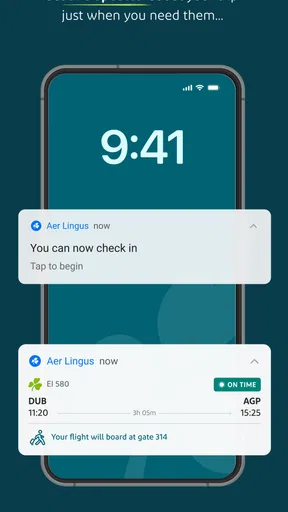
Travel information is time-sensitive, so notifications can be helpful when they relate directly to a journey. They can also become distracting if I accept every prompt without thinking. I prefer enabling only the alerts that support a real travel need and reviewing the phone’s notification settings later if the messages become excessive.
This is one of the app’s important user-agency questions: do I want the app to be a quiet tool I open when needed, or a more active companion that can draw my attention during the trip? Different travelers will answer differently. Someone flying occasionally may prefer fewer interruptions, while a frequent passenger may value timely reminders. The right choice is personal, and I would rather make it deliberately than leave every option at its default.
The same principle applies to location-related prompts or other device access requests if they appear during use. I would consider whether the requested access is necessary for the immediate task, grant it only when I understand the benefit, and revisit it through the phone’s settings if my needs change. I do not interpret a request as proof of a problem, but I also do not approve access automatically.
A realistic airport-day workflow
Imagine that I have booked a short trip and am leaving home early. The night before, I open the app to review the booking rather than searching through a crowded inbox. I check the route and date, confirm that the passenger information looks right, and make sure I know where the relevant travel details are. In the morning, I use the app as a reference point instead of relying on memory or an old note.
If the trip involves other airlines or separate transport, I keep those details elsewhere as well. This is a small but important insight: an airline app can be excellent for one segment while still being incomplete as a whole-trip organizer. I would not delete my hotel confirmation or train information simply because the flight is visible in Aer Lingus App. I use it as the authoritative place for the Aer Lingus booking and keep a separate overview for everything around it.
Another useful habit is to avoid making a major change while distracted in a queue or at the airport gate. A small screen and a stressful environment are a poor combination for reviewing dates, names, or options. If a change is necessary, I read the confirmation carefully and save the resulting information in a way I can find again. The app can make access easier, but it cannot remove the need for attention.
Where the experience may feel limited
The focused design that helps regular Aer Lingus passengers may feel restrictive to travelers who want a broad market view. If I am open to any airline, I would rather begin with a service that compares many carriers and presents a wider range of routes. Aer Lingus App is not the tool I would choose for discovering every possible way to reach a destination.
It may also be less suitable for people who want one application to manage a complicated itinerary across several providers. A dedicated itinerary organizer can offer a wider trip overview, while a browser may feel more comfortable for travelers who need a large screen during detailed research. The mobile app’s convenience is most valuable when I already know the airline connection and want quick access to that part of the journey.
Another limitation is psychological rather than technical: because the app is tied to one airline, I need to remain aware of the wider booking context. A direct airline workflow can feel reassuring, but I still compare the overall journey, read the final terms presented during booking, and think about whether the schedule suits me. Direct does not automatically mean best for every passenger.
Compatibility, maturity, and everyday practicality
The app was released on February 2, 2016, and its current version is 26.4.1. It supports Android 7.0 and later, which makes it accessible to many older Android phones as well as newer devices. That broad compatibility is useful for travelers who do not replace their phone frequently, although I would still keep the operating system and app updated when possible for general security and reliability.
Its Everyone age rating also fits the practical nature of the service. There is no reason for the basic travel workflow to be aimed at a narrow age group, and the rating makes it straightforward for families to consider. Parents booking travel for children should still check every passenger field themselves; an age rating does not remove the responsibility of reviewing booking information.
The large number of installs and strong average rating suggest that the app has become a familiar part of many passengers’ travel routines. I treat that as useful context rather than a guarantee that every interaction will be perfect. A rating reflects many experiences, while my own satisfaction depends on the route, the booking situation, the phone I use, and how clearly I follow each step.
Who should use it, and who should choose something else?
I would recommend Aer Lingus App to someone who has decided to fly with Aer Lingus and wants a direct way to search, book, and manage the flight. It is also a sensible choice for passengers who prefer using an official airline channel instead of leaving the entire journey inside a third-party booking service. The free installation and accessible age rating make it easy to try without turning the decision into a major commitment.
I would be more cautious about recommending it as the only travel app for a complex trip. If I were comparing multiple airlines, assembling a multi-city journey, or coordinating flights with trains and hotels, I would pair it with a broader comparison or itinerary tool. That is not a criticism of its central purpose; it is simply a reminder to match the tool to the job.
For privacy-conscious users, my recommendation is to use the visible choices carefully. Review prompts, consider notifications one by one, and avoid entering information merely because a field is available. The app is most comfortable for me when I remain in charge of the relationship: I decide when to sign in, what to share for the booking task, and which alerts deserve my attention.
My cautious verdict
Aer Lingus App succeeds because it does not need to be everything. It gives Aer Lingus passengers a direct mobile route into flight search, booking, and trip management, and its strong public reception supports the impression that many people find that role useful. I especially value it after the booking is made, when having the airline-specific details close at hand is more practical than navigating a general travel marketplace.
My final advice is to use it with a two-stage mindset. First, compare and think carefully if you are still deciding how to travel. Then, once Aer Lingus is the right choice, use the app to keep that booking organized and accessible. Check each important detail, treat personal information thoughtfully, and make notification or account decisions consciously. The app is most trustworthy when it supports your choices without replacing your judgment.
For an Aer Lingus passenger, I would install it and keep it available for the booking and management stages. For someone seeking the widest possible airline comparison or a complete multi-provider itinerary, I would choose another tool alongside it. That balanced role is where the app makes the most sense: a focused, official companion for Aer Lingus travel, useful precisely because I know what I am asking it to do.
Pros
- Manage bookings
- check in
- and access boarding passes in one place.
- Flight status updates help you track delays and gate changes.
- Supports mobile boarding passes for quicker airport processing.
- Useful travel information is available before and during your trip.
- The interface is generally simple for routine booking management.
Cons
- Some features may be limited for codeshare or partner-operated flights.
- App performance can vary when airport Wi-Fi or mobile data is weak.
- Changing bookings may still require contacting customer support.
- Notifications may not always arrive promptly for last-minute updates.
- Certain fares and extras can be easier to compare on the website.
FAQs for Aer Lingus App
What can I do with the Aer Lingus app?
The Aer Lingus app brings many common travel tasks into one place. After signing in or adding a booking, you can review your itinerary, check flight details, manage selected booking options, and access your mobile boarding pass when available. It can also provide travel updates and useful airport information, making it more convenient than relying only on printed documents or email confirmations.
Can I check in for my Aer Lingus flight using the app?
Yes, the app supports mobile check-in for eligible Aer Lingus flights, although availability depends on the route, booking type, and airport rules. During check-in, you may be able to confirm passenger details, select or review seats, and obtain a digital boarding pass. It is still wise to arrive with enough time for baggage drop, security, and any document checks.
Does the Aer Lingus app work with flights booked through a travel agency or another airline?
The app may display some bookings made through travel agencies or partner airlines, but compatibility is not guaranteed for every itinerary. You generally need the booking reference and passenger information, and certain services may be limited when another carrier operates part of the journey. If the reservation cannot be retrieved, use the airline or agency that issued the booking for assistance.
Can I use the Aer Lingus app to manage baggage, seats, or flight changes?
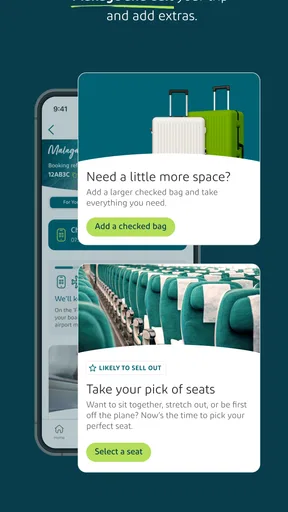
Depending on your fare, route, and booking conditions, the app may let you review or purchase options such as checked baggage and seat selection, as well as access available change or upgrade features. Restrictions and additional charges can apply, particularly for partner-operated flights or special fares. Always review the final price and updated itinerary before confirming any modification.
What should I do if the app does not show my boarding pass or stops working at the airport?
First, check that you have an internet connection, that the booking details were entered correctly, and that the app is updated to the latest version. Try reopening the app or saving the boarding pass before leaving for the airport. If it remains unavailable, Aer Lingus airport staff can usually help with check-in or provide a printed boarding pass, subject to airport procedures.


